Why SO DataGrid
Non-intrusive
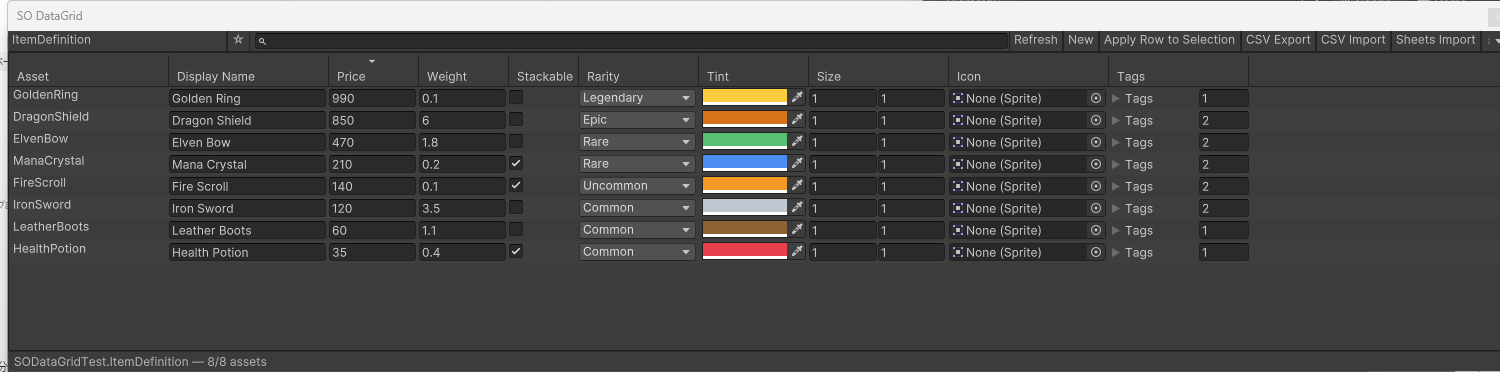
Works with plain ScriptableObjects. No base class, no attributes, no code changes. If it shows in the Inspector, it shows in the grid.
Bulk editing that respects Undo
Every cell edit goes through Unity's serialization and Undo systems. Apply one row's values to a whole selection in one click.
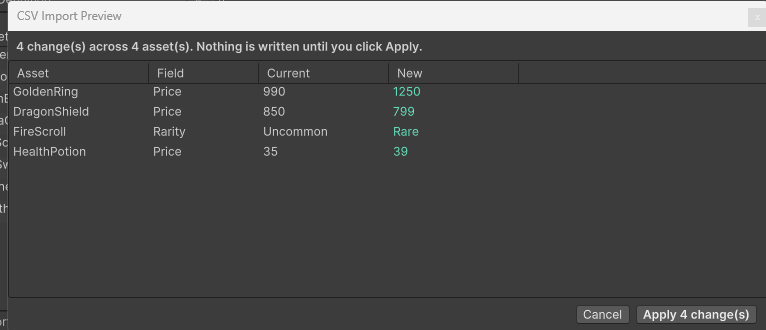
Import preview — see every change first
CSV and Sheets imports list every pending change (asset, field, current → new). Nothing is written until you click Apply.
Excel & Google Sheets round-trip
Export, edit in your spreadsheet app, import back. Google Sheets needs only a share link — no OAuth, no API key. Colors, vectors and exact doubles included.
Fast at 1,000 assets — measured
Type selection in 90 ms, column sort in 165 ms over 1,000 assets, guarded by an automated performance test.
Search, sort & organize
Searchable type picker with ★ favorites, name filter, column sorting, right-click duplicate/delete — even nested types the Project search can't see.
Editor-only, zero footprint
Ships nothing into your builds. No runtime code, no scene objects, nothing added to your Assets folder. Everything included — no add-ons.
Unity 2022.3 LTS & Unity 6
An automated test suite (9 tests) runs on both versions with zero compiler warnings.
Quick start
| 1 | Install from the Asset Store / Package Manager. |
|---|---|
| 2 | Open Window > SO DataGrid. |
| 3 | Pick a ScriptableObject type from the searchable dropdown — every asset instance appears as a row. |
| 4 | Edit cells inline, sort by clicking headers, filter with the search box. |
| 5 | CSV Export → edit in your spreadsheet app → CSV Import. Int / float / bool / string / enum fields round-trip; the AssetPath column is the row key. |
Support
Questions, bug reports, feature requests: kyosyunn@gmail.com — replies within 2 business days.